UK SHIP, NO TAX

Tuesday, 18 October 2016

R280 CAS4 programmer read&write BMW MCU 5M48H

The R270 BDM programmer updated version - R280 PLUS BMW CAS4+ BDM programmer, was rolled out now at obdexpress.co.uk. This R280 plus can read and write all BMW CAS4, read and write the latest BMW Motorola MC9S12XEP100 chip (5M48H/1N35H).


Here, we go to read & write BMW MCU 5M48H.
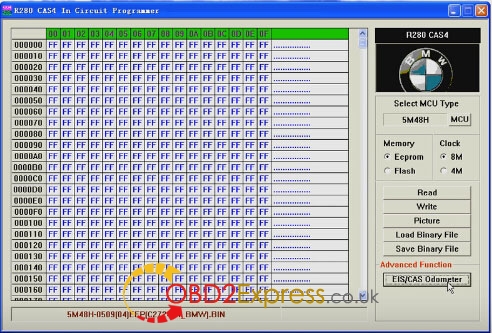
R280 CAS+ IN CIRCUIT Programmer read 5M48H eeprom


R280 BDM programmer correct EIS/CAS odometer


R280 plus cas4 programmer write dumps to MCU


Cas4 programmer read MCU 5M48H


R280 programmer check EIS/CAS odometer


Done!


Monday, 10 October 2016

Can KTM100 fw v7.003 read write edc17c64 VAG?

 I was tested KTM100 fw v7.003 clone no reworked read write edc17c64 VAG with no problem.Loaded remap in octavia 3 rs. ktm100 (SE87-D) from obdexpress.co.uk cost €345.00 free shipping
 KTM100 fw v7.003  read write edc17c64 VAG


 KTM100 fw v7.003  read write edc17c64 VAG

 KTM100 fw v7.003  read write edc17c64 VAG

 KTM100 fw v7.003  read write edc17c64 VAG

 KTM100 fw v7.003  read write edc17c64 VAG

 KTM100 fw v7.003  read write edc17c64 VAG

 KTM100 fw v7.003  read write edc17c64 VAG

http://www.obdexpress.co.uk/wholesale/ktm100-ktag-k-tag-firmware-ecu-new-programming-tool-master.html

Thursday, 6 October 2016

How to solve Xprog-m v5.5.5 “verify error”

Here are important tips for all xprog users when they got this problem "verify error" during reading motorola mcu, and after try several time is read maybe.
Xprog software used:
Usually two xprog with same problem v5.45 / v5.55

The MAIN reason & solution:
Xprog version 5.5.5 is not so stable, find download 5.5.1 and downgrade it, its the most stable for clones available

Possible reasons and solutions:
- Internet issue
Reinstall on fresh PC, and don’t connect that to internet!!! Internet off.. then rewrite firmware v555

- power supply problem
Check power supply to xprog

- virus problem
Only fresh OS and fresh software, directly from disk or from safe link...doesn't mater if internet is on or off...etc
Only virus problem...tested 1000%


Xprog 5.5.1 update steps:
1. Erase chip atmega 64
2. Program eeprom , Flash
3. Set Lock bits and fuse bits. Program lock bits, fuse bits.
4. Copy Xprogbox 5.51 to C:\ and run Xprognew.reg
5. Run XprogDesktop.exe and update .

Here are some Xprog users feedback when tried to downgrade to v5.51
*1
I had same problems today with 5.5.5, after few weeks i've got verify errors on motorola and 5p08c eeprom . What i did was deleted xprog folder (it was without instalation without dongle), go into registry editor (win xp) search for "xprog" deleted all registry keys with that tag and again copied clean folder (instalation) of xprog software and it worked. Also i disconected internet connection before everything.
*2
I had the same problem,with 555 firmware, reading always different data, but sometimes correct,just sometimes.I back to 551 firmware and reading now without problem,may be need some hardware modification
*3
had same story with 5.5.5 downgraded to 5.5.1 and used no dongle software with new usb cable and now all running smooth it was ver 5.5.3 with dongle when i got it so i want up up and back down 5.5.1 is stable and no problems

Tips to avoid Xprog “verify error” issues:
older versions (lower than v5.55) are favorable now, without “verify error”:
Xprog 5.50
Xprog-m v5.30

Tuesday, 27 September 2016

(solved) Launch X431v+ files deleted before authorization

User puzzles:
I haven’t opened the authorization but deleted the files in the Launch X431V+ pad by accident. Then the icon of X431V+ disappeared. How to solve this?


Solution from obd2express engineers:
1- open X431V plus authorization firstly
2- in the x431v+ pad, go to the official website ( http://dbscar.com/) and register your pad
3- app there after registration, then download the files you need.

Tuesday, 20 September 2016

How to use the ICOM multiplexer with the MOST port?

What is BMW ICOM?
ICOM refers to Integrated Communication Optical Module.
The ICOMs are the interfaces for the repair of BMW and MINI vehicles recommended by BMW. The ICOM is specifically designed for BMW and MINI vehicles. The ICOM incorporates powerful
processors and a high storage capacity. This allows for faster communication than with a PTT.
Nowadays, there are three versions of ICOM hardware: ICOM AICOM A2ICOM A3ICOM A3 pro

What is a ICOM kit?
There are three different ICOM components available. These can handle all vehicles of the BMW
Group:
  • ICOM A for OBD communication
  • ICOM B, in combination with the ICOM A, for MOST communication
  • ICOM C, in combination with the ICOM A, for 20 PIN diagnostic connector.

How to connect ICOM to OBD interface?
Connect ICOM A directly to the computer's unused network port. No other equipment or multiple port hubs should be connected between the ICOM and the computer. Connect the ICOM A OBD connector to the OBD socket in the vehicle. The ICOM A OBD connector can be folded to an angle to adapt it for use in the wide variety of OBD socket locations encountered in various vehicles.

How to use the ICOM multiplexer with the MOST port?
The supplementary ICOM B module will also be required to connect the vehicle's MOST port. Proceed by attaching the USB ports from ICOM A and ICOM B to the USB cable. Then connect ICOM A directly to the computer's unused network port. Complete the process by connecting ICOM B to the vehicle's MOST port through the MOST connector while also plugging the ICOM A OBD connector into the vehicle's OBD socket. If the system subsequently fails to recognize the MOST port or the ICOM, please repeat the process.How to connect ICOM mux to 20 Pin adapter on the vehicle?
Connect the ICOM to the network port on the PC first. Then connect the ICOM C to the ICOM A. Finally, connect the ICOM C to the vehicle 20 Pin diagnostic connector.

How long should you take to communicate with ICOM emulator?
Waiting period for recognition of an ICOM It can take up to 15 minutes before an ICOM is detected after the connection to the PC. It is advisable to connect the ICOM immediately after boot up of the PC, and then start the OSS software..

What are the compatible software?
Software ListSoftware Function
1ISPI-NEXT Admin ToolsISPI-NEXT authorization software
2ISPI Admin ClientISPI-NEXT authorization management and environment Configuration software
3ISTA-D(Rheingold)Diagnostic and repair guide, including Diagrams and disassembly Figure
4ISTA-P(ISSS-NEXT)Programming and coding software system
5HDD-UpdateNavigation software upgrade back-office services (function with ISTA-P, need to Import map files)
6KSDWork software
7ETKAccessories Catalog
8E-SYSEngineer Software for F series (available for programming and coding)
9WINKFPEngineer Software for E series, for programming
10NCS-Expert toolEngineer Software for E series, for coding
11INPAEngineer Software for E series, for diagnosis
12Tool32Engineer Software for E series, able to run directly
13BMW Coding ToolAuxiliary Software of Engineer Software for E series (Available to import model data to WINKFP and NSC)
14NcsDummyAuxiliary Software of Engineer Software for E series (Available to modify NCS data)
15IToolRadarUsed to recognize ICOM, activate or release ICOM Port
16EasyConnectUsed to Configure the Environment Parameter of Engineer Software for E series, can activate or release ICOM Port
How do people think of the newest ICOM firmwares?
BMW ICOM A3 for vehicles with OBD access receives a significantly more powerful processor and more storage capacity.
Robust aluminium case will help to avoid damage when using in harsh environments.

i checked the firmware; it’s the new version 1.4.0. So, two points i wanna say:
First, it is ICOM A2 with build in usb-ethernet adapter.
Second, it is K+DCAN interface built in A2 casing.

Icom a3 - can programme all units - but not media. I am planing to buy A2. As i know - the only difference with A1 - there is no "swimming" connector - that can be broken, and soon begin to look like sh*t with isolation tape. This is not series when you do F-series))) so, Buy ICOM A2 with most connector - and you will become a great BMW master (+ few years of learning needed)

Tuesday, 13 September 2016

How to one key upgrade obdstar

Here's OBDSTAR one key upgrade guide
products :
Step 1: Remove the TF card from your device.

Insert your TF card into computer.

Format your TF card and ensure it is empty.

Obdstar-One-key-upgrade-1


Step 2: Login our website,and click “One Key upgrade”
 obdstar-one-key-upgrade-2


Step3: Download and install the “One Key upgrade”. You will see this software.


Step4: Open the “one key upgrade”. Input your username and password. Then select “End User” and click “Log in”.


Step5: Input your S/N.


Step6: Select all and click “Upgrade”.


Step7: Upgrade is completed.


Step8: Open your TF card. You will see these files.


Step9: Remove the TF card from the computer. Insert your TF card into the device. Update


source:http://blog.obdexpress.co.uk/2016/09/12/easiest-way-to-upgrade-obdstar/

Thursday, 8 September 2016

Digiprog3 iii v4.94 hardware PCB with FTDI FT232BL chip

Good news for Digiprog 3 (DP3) odometer programmer. The Digiprog hardware was enhanced and updated with more excellent PCB design with FTDI FT232BL chip.


Source: http://www.obdexpress.co.uk/wholesale/main-unit-digiprog3-iii-digiprog-3-odometer-programmer.html


Some China Digiprog iii come without FTDI chip!


digiprog-3-without-ftdi-chip


Original:http://www.mileageprogrammer.com/digiprog3-iii-v4-94-hardware-pcb-with-ftdi-ft232bl-chip/