UK SHIP, NO TAX

Showing posts with label car key programmer. Show all posts

Sunday, 5 March 2017

Add Key Data To SEC-E9 CNC Step By Step

This instruction is about how to add key date to SEC E9 CNC key cutting machine step-by-step.

Tool Description:

SEC-E9 CNC Automated Key Cutting Machine is able to cut standard keys and high security keys, such as BMW, VW, HONDA, OPEL,etc, SEC-E9 also supports to cut house keys, including dimple keys, tubular keys, single standard keys and motorcycle keys. Ford Tibbe keys and LDV keys are available to cut. SEC-E9 is a good choice for locksmith since you do not need to buy other small key cutting machines for house keys, just need to buy the corresponding clamps for different key types. Moreover, SEC-E9 can cut a new key without original key. It is the main difference from the traditional manual key cutting machine.

How to add date step guide here:

Power on the SEC-E9 key cutter

Click “my key information” button at left bottom on the home page to go to next page.

add-key-data-to-sec-e9-1

Please click “create new” button at right bottom on screen.

add-key-data-to-sec-e9-2

Please pay attention to alerts, and please click “OK” button if you are familiar with details of key

Click input field at upper right, then click the right keyboard button

add-key-data-to-sec-e9-3

Input new needed manufacturers of keys, locks or cars, then click “OK” button
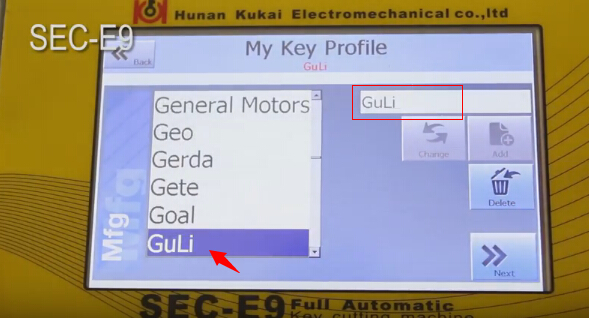
add-key-data-to-sec-e9-4

please click “Add” button to add manufacturer name to left list

Input new needed models of keys, locks or cars

add-key-data-to-sec-e9-5

click “Add” button to add input model to list

Select model you added, then click Next bottom

Then input model production year (Year from and Year to)

add-key-data-to-sec-e9-6

Click “Add new” button

Select the new option and click “select card” button

add-key-data-to-sec-e9-7

Input key information according step by step

add-key-data-to-sec-e9-8

Then select Create & Select button

Then go to next page, you will see a data ID number in list

add-key-data-to-sec-e9-9

Click “Add” button, and it means you finish adding data.

Click “View information” button to view input data.

add-key-data-to-sec-e9-10

Back to SEC-E9 key cutting machine home page and enter “my key information” page, and you will find the added manufacturer and model


add-key-data-to-sec-e9-11

add-key-data-to-sec-e9-12

add-key-data-to-sec-e9-13


You can start to cut keys if the data is correct.

This article support by A leading online exporter of car diagnostic tools official blog:http://blog.obdexpress.co.uk/2017/03/06/add-key-data-to-sec-e9-cnc-key-cutting-machine/


Monday, 13 February 2017

How to program a new key to Honda with Honda HDS scanner

How to program a new key to Honda using a Honda HDS HIM diagnostic tool (supporting basic diagnostics, programming incl. VIN reading & Immo programming)... For details, here you go...to program honda key transponder.

To add one new key/Keyless transmitter, you need:
  1. Immobilizer Mater Key Blank or Immobilizer Valet Key Blank
    2. One programmed ignition key (master or valet) for the vehicle
    3. Vehicle key code
    4. PCM code
  2. Honda HDS HIM diagnostic tool with immobilizer programming software
HDS 3.101.015 (!! cheap honda hds cable only for diagnosis)
The HDS is required for registration of the immobilizer keys. Programming the immobilizer also programs the keyless transmitter.
Use the HDS with Honda key blacks to add a key or keyless control unit, storing the transponder code of the new key in the memory of the control unit.
  1. Condor XC-MINI key cutting machine
NOTE:
Make sure the market, the date, and the time on the HDS setup screen are correct.
Select the F12 key in the upper right corner to get the Set-up Details screen.
Make sure Market is set to USA.
Select the time display in the lower right corner to get the Date/Time Properties pop-up window.

How to program a new key to Honda with Honda HDS scanner:
1) Use an appropriate key blank and the key cutting machine to cut a new ignition key.
2) Connect the Honda HIM diagnostic system with vehicle via OBD socket
3) Insert a programmed ignition key into the ignition switch
4) Turn ignition ON
5) Run Honda diagnostic system personal computer (pc) software and come to iN screen
6) At the screen prompts, enter the VIN and the odometer reading, then verify the correct date and time.
7) Select “IMMOBI” from “System Selection” Menu
8) Select “Immobilizer Setup” from “Immobilizer Test Mode” Menu
9) Select Add and Delete Keys
10) Select Add 1 Key
11) Select Begin to Add 1 Key
12) Follow the HDS screen prompts, if your HDS is not logged in to the iN, you willhave to enter the PCM code you have retrieved from the iN Immobilizer Code Inquiry to proceed.
13) When adding keys procedure completed, turn ignition OFF
14) Exit HDS software and disconnect Honda HIM HDS scan tool from the vehicle


P.s. This is the Honda HDS pocket tester in use.
Honda-HDS-Key-Programming (1) Honda-HDS-Key-Programming (2)

Friday, 6 January 2017

VVDI MB BGA TOOL V2.1.6 Add support for lost all key W216, W164 2009-

Update  News at obdexpress.co.uk! Xhorse VVDI MB BGA TOOL V2.1.6 is released online,  obdexpress will offer the free download link, latest update info and user feedback.
Xhorse VVDI MB BGA TOOL V2.1.6


Free download:
Xhorse VVDI MB BGA TOOL 2.1.6 --(Mega)

https://mega.nz/#!2hJGnaRC!pLgcYsLYc0aK_km2Tz3juptzb3ImqhBnPYBccUaVaCk
Extracting Password: 123456

Detailed update information(2017.01.07):
=====BENZ V2.1.6=====
1. Attention: All user update device to firmware v2.1.6, software v2.1.6
2. User manual v1.7 released, overview v1.7 released
3. BGA password calculation: Add support for lost all key W216, W164 2009-
4. Exchange W204 ESL without renew EIS. In ESL Tools, write EIS with password(Select Auto clear TP and personalized)
5. Activate key: Change key status from unuse to used
6. Bug fix for read v57 version password from key with NEC key adapter
7. Bug fix
Xhorse VVDI MB BGA TOOL V2.1.6


How to update VVDI MB TOOL firmware?
1. Connect VVDI MB TOOL to PC with USB cable
2. Run VVDI MB TOOL V2.1.6, then choose firmware version 2.1.6 from Firmware List
3. Press button Update Online, wait the progress end
4. If failed to get firmware list or get something like “communicate with server error!” while update your device, close antivirus and firewall programs, try again. Change your internet provider once failed again
Note: DON’T shutdown your PC or disconnect USB cable while update device
Xhorse VVDI MB BGA TOOL V2.1.6


User feedback on this new VVDI MB TOOL V2.1.6
Xhorse VVDI MB BGA TOOL V2.1.6


I have tested on my W164 2010 all key lost, it is working now, I think it’s very useful for others, will save you much money, thanks to this key programmer!

Sunday, 25 December 2016

OBDSTAR F101

Four top reason to recommend obdstar f101
1. OBDSTAR F101 is appropriated for remote, programming Car Keys and smart key of TOYOTA vehicles.
2. It’s easy to carry,and its appearance is designed elaborately.
3. The main unit system adopts ARM high speed chip to keep it running fast,stable and anti-jamming.
4. Upgrade via TF card at any time.
1. Support 4D(67,68) chip immobilizer reset(All keys lost).
2. Support 72 chip(WITH G,EUROPE) immobilizer reset(All keys lost).American TOYOTA with G key Reset will upgrade soon!
3. Support smart key reset before 2009(All keys lost).
4. Add/erase Keys for all of TOYOTA cars.
5. Add/erase smart keys for all of TOYOTA cars.
6. Add/erase remotes for most of TOYOTA cars.
7. No need to connect with computer, plug and play, automatic transfer.
8. No need to buy tokens.
9. One Key Upgrade
10. Have good man-machine interaction.
Package Includes:
1pc x   F101 main unit
1pc x   TF Card


Tuesday, 18 October 2016

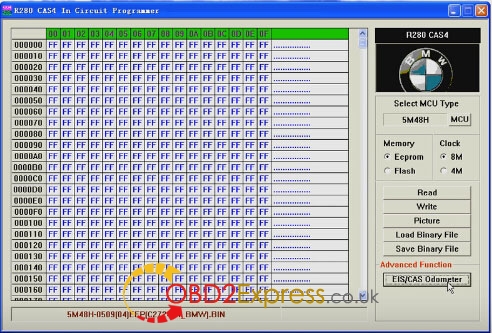
R280 CAS4 programmer read&write BMW MCU 5M48H

The R270 BDM programmer updated version - R280 PLUS BMW CAS4+ BDM programmer, was rolled out now at obdexpress.co.uk. This R280 plus can read and write all BMW CAS4, read and write the latest BMW Motorola MC9S12XEP100 chip (5M48H/1N35H).


Here, we go to read & write BMW MCU 5M48H.
R280 CAS+ IN CIRCUIT Programmer read 5M48H eeprom


R280 BDM programmer correct EIS/CAS odometer


R280 plus cas4 programmer write dumps to MCU


Cas4 programmer read MCU 5M48H


R280 programmer check EIS/CAS odometer


Done!


Friday, 19 August 2016

Step by Step How to use Condor XC-MINI to cut Hyundai Key

Taday ,we will shares you how to to use Condor XC-MINI master series automatic key cutting machine to cut Hyundai Key.

Tools need:

*Original iKeycutter CONDOR XC-MINI Cutting Machine

* a new key blad

Step1. Start CONDOR XC-MINI, click “Key Database”, choose “Hyundai” and click “Confirm” button.
condor-xc-mini-cut-Hyundai-key-1


Step2. Input key code, XC-MINI will show you “Series”, “Cuts Note” and “Compatible Key”, click “Confirm” button.

 Smart-Key-Teach-in-ECU-type-2
 Smart-Key-Teach-in-ECU-type-3


Step3. Now you can see the “Align Line” picture, so you can make the new key blade in right position.
 Smart-Key-Teach-in-ECU-type-4

 Smart-Key-Teach-in-ECU-type-5

 Smart-Key-Teach-in-ECU-type-6


Step4. After that, tighten the key locking knob. Click “Cut” button to start key- cutting. Now you use XC-MINI CONDOR  to cut Hyundai key successfully.

 Smart-Key-Teach-in-ECU-type-8

 Smart-Key-Teach-in-ECU-type-8

 Smart-Key-Teach-in-ECU-type-9


Done !
source:http://blog.obdexpress.co.uk/2016/08/19/cut-hyundai-key-use-original-condor-xc-mini/