UK SHIP, NO TAX

Monday, 16 January 2017

Launch M-Diag Android&IOS Bluetooth OBD2 Scanner at obd2express.co.uk

Launch M-Diag is an easy to use OBDll diagnostic tool mainly designed for the professional technician. The device is small and portable, yet power-full enough to rival its competitors.

Launch M-Diag Scanner can easily communicate with Android and iOS devices via Bluetooth. This means more convenience to drivers who want to easily diagnose their cars minus the hassle brought by some wires.

M-Diag really a small box, big function:
◇ I/M Readiness Monitor
◇ Read DTC’s
◇ Clear DTC’s
◇ Read Freeze Frame Data
◇ Read and Graph Data Stream PID’s
 Full System Scan *   
 Actuation Tests *  
 Special Functions *
Launch-M-Diag-Android-IOS-Bluetooth-OBDII-Scanner-2
Attractive M-Diag
  1. Support Multi-Language
English, Chinese, Spanish, French, Italian are available

  1. Small and portable
Light and small OBDll device, easy to handle;
Plug and play through Bluetooth connection with smart phone

  1. Widest carline software coverage
Support the generic OBD, CAN bus, and proprietary protocols of over70 car manufacturers and2, 500 car models;
Support multiple special function software and actuation tests.

  1. Economical but powerful
Options to purchase manufacturer specific carline software based on needs
Full-system diagnostics including bl-directional capabilities

Who should consider buying Launch M-Diag?
Launch M-Diag Mini Scanner is highly-recommended to amateur and professional auto mechanics.
For amateur auto mechanics, the scanner can send out useful data like engine speed, temperature, and fuel economy. These can provide users a somewhat complex, but easy-to-understand view about their cars that can serve as guide when troubleshooting car problems.
For professional auto mechanics, reading generic and OEM trouble codes, do full system diagnosis, play with special functions…. This diagnostic tool likewise offer more features that would surely complement to every professional mechanic’s existing set of automotive tools and equipment.


Kindly Note:
Launch X431 iDiag Auto Diag scanner will not come with software in the package, only hardware. But we will offer you Launch X431 register name & password. Users have the option to purchase manufacturer specific carline software based on their needs.

M-Diag available on the Apple App Store & Google Play Store:Launch-M-Diag-Android-IOS-Bluetooth-OBDII-Scanner-3

M-Diag Specs
Vehicle portStandard OBDII port
Bluetooth BT 2.0
Dimensions48mm × 24mm × 65mm
Typical power consumption(12V) quiescent current 25mA
Device operating current 35mA
Operating Temperature-20 to 55℃ ( -4 to 131°F )
Storage Temperature -30 to 70℃ ( -22 to 158°F )
Storage humidity < 80%
Operating humidity< 60%
Net Weight 55g
Operating voltage Vehicle battery DC entry 9 to 15V

What you will get in the package:
1pc x M-Diag Connector
1pc x Password Paper

Two version at obdexpress.co.uk:
Launch M-Diag Plus( One Free Car Software)
This aritcle is from the leading online exporter of OBDII Scanner official blog:http://blog.obdexpress.co.uk/2017/01/12/m-diag-android-ios-bluetooth-obd2-scanner/

Friday, 6 January 2017

VVDI MB BGA TOOL V2.1.6 Add support for lost all key W216, W164 2009-

Update  News at obdexpress.co.uk! Xhorse VVDI MB BGA TOOL V2.1.6 is released online,  obdexpress will offer the free download link, latest update info and user feedback.
Xhorse VVDI MB BGA TOOL V2.1.6


Free download:
Xhorse VVDI MB BGA TOOL 2.1.6 --(Mega)

https://mega.nz/#!2hJGnaRC!pLgcYsLYc0aK_km2Tz3juptzb3ImqhBnPYBccUaVaCk
Extracting Password: 123456

Detailed update information(2017.01.07):
=====BENZ V2.1.6=====
1. Attention: All user update device to firmware v2.1.6, software v2.1.6
2. User manual v1.7 released, overview v1.7 released
3. BGA password calculation: Add support for lost all key W216, W164 2009-
4. Exchange W204 ESL without renew EIS. In ESL Tools, write EIS with password(Select Auto clear TP and personalized)
5. Activate key: Change key status from unuse to used
6. Bug fix for read v57 version password from key with NEC key adapter
7. Bug fix
Xhorse VVDI MB BGA TOOL V2.1.6


How to update VVDI MB TOOL firmware?
1. Connect VVDI MB TOOL to PC with USB cable
2. Run VVDI MB TOOL V2.1.6, then choose firmware version 2.1.6 from Firmware List
3. Press button Update Online, wait the progress end
4. If failed to get firmware list or get something like “communicate with server error!” while update your device, close antivirus and firewall programs, try again. Change your internet provider once failed again
Note: DON’T shutdown your PC or disconnect USB cable while update device
Xhorse VVDI MB BGA TOOL V2.1.6


User feedback on this new VVDI MB TOOL V2.1.6
Xhorse VVDI MB BGA TOOL V2.1.6


I have tested on my W164 2010 all key lost, it is working now, I think it’s very useful for others, will save you much money, thanks to this key programmer!

Wednesday, 4 January 2017

How to convert MPPS V13 to MPPS V16 V18

For those who use MPPS v13
it is possible to have MPPS V16 features in your v13.
Only what you need – just copy folders CHECK,DATABASE,DRIVES into your MPPS directory.
DEVICE DRIVER folder – that is the driver for mpps v16 cable.
Link: https://yadi.sk/d/KbsAkzR_33DRMe
password : abdo0099mhh(BIG THANKS to abdo0099)

I have not tried this yet but hoping that someone has more time than I got… So you may take a risk to try it.
And for your own security , rename your old folders – in a case something go wrong.
You should get newest ECU checksums and drivers .

But, if you don’t wanna be risky to do something with mpps software, it should be a good choice to spend some dollars on crack mpps china clone or eu clone:
MPPS v16 clone: $24 (€23.99)
MPPS V18 china clone: $96 (€94)

Monday, 2 January 2017

TOYOTA HILUX VIGO 2010 All Key Lost using X300 Pro3


Here we test ok on using obdstar x300 pro3 key master to reset a G  chip key for 2010 TOYOTA HILUX VIGO  when all key lost 

Device: only OBDSTAR X300 Pro3

Vehicle model and year: TOYOTA HILUX VIGO 2010
X300-Pro3-Reset-Toyota-G-chip-72-when-all-key-lost-1

G chip key
X300-Pro3-Reset-Toyota-G-chip-72-when-all-key-lost-2

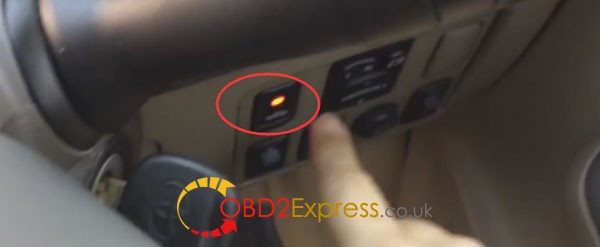
Now all key lost, when insert new key, the security light do not go off, that means the key is new one.
X300-Pro3-Reset-Toyota-G-chip-72-when-all-key-lost-3

Turn on with the new key
Go to the key master and Choose IMMOBILIZER -> TOYOTA/LEXUS -> TOYOTA/LEXUS V31.09
X300-Pro3-Reset-Toyota-G-chip-72-when-all-key-lost-4

It is loading...
Initializing...
Authorizing...
Choose “Immobiliser” and press ENTER
X300-Pro3-Reset-Toyota-G-chip-72-when-all-key-lost-5

Type 2(with G 72)
X300-Pro3-Reset-Toyota-G-chip-72-when-all-key-lost-6

Reset immobiliser (All key lost)
X300-Pro3-Reset-Toyota-G-chip-72-when-all-key-lost-

Switch ignition off and press ENT to continue
X300-Pro3-Reset-Toyota-G-chip-72-when-all-key-lost-8

Switch ignition on and press ENT
X300-Pro3-Reset-Toyota-G-chip-72-when-all-key-lost-9

Switch ignition off and remove the key, then press ENT
X300-Pro3-Reset-Toyota-G-chip-72-when-all-key-lost-10

X300 key master is configuring the system, wait...
Switch ignition on and press ENT
X300-Pro3-Reset-Toyota-G-chip-72-when-all-key-lost-

OBDSTAR X300 key master is configuring the system, wait...
Now the security light steady prompt
X300-Pro3-Reset-Toyota-G-chip-72-when-all-key-lost-12

Switch ignition off and remove the key, then press ENT
X300-Pro3-Reset-Toyota-G-chip-72-when-all-key-lost-13

X300 Pro3 will prompt you:
For make only 1 key: turn on with new key for 5 seconds then turn on-off 5 times until security light go off.
X300-Pro3-Reset-Toyota-G-chip-72-when-all-key-lost-14

X300-Pro3-Reset-Toyota-G-chip-72-when-all-key-lost-15

X300-Pro3-Reset-Toyota-G-chip-72-when-all-key-lost-16

X300-Pro3-Reset-Toyota-G-chip-72-when-all-key-lost-17

Done! Reset TOYOTA G Chip with key master success!
Now it can start

X300-Pro3-Reset-Toyota-G-chip-72-when-all-key-lost-18


Friday, 30 December 2016

Relearn new TPMS Chevy Avalanche 2011 with EL-50448

How to use EL-50448 make new TMPS on cars?here is a example of make new TPMS for 2011 Chevy Avalanche using EL-50448
Tool:EL-50448 TPMS reset tool

Car model:2011 Chevy Avalanche

Follow step guide :
Tire PSI won’t show the value on dashboard, because car TPMS system will not automatically recognize after change new Sensor.
EL-504483-Relearn-new-TPMS-Chevy-Avalanche-
Set the gearshift lever to "P"
Turn on the ignition
Roll down car window
Press to enter learning mode


EL-504483-Relearn-new-TPMS-Chevy-Avalanche-4EL-504483-Relearn-new-TPMS-Chevy-Avalanche-5
Get out of car and close Door, Let’s start with the left front wheel, Hold  EL-50448  close to the valve stem.
EL-504483-Relearn-new-TPMS-Chevy-Avalanche-6
Then front-right wheel
EL-504483-Relearn-new-TPMS-Chevy-Avalanche-7
Rear-right wheel
EL-504483-Relearn-new-TPMS-Chevy-Avalanche-8
Rear-left wheel
EL-504483-Relearn-new-TPMS-Chevy-Avalanche-9
Open the door and go inside the car
You will find the Tires PSI are displayed on dashboard
Done!
EL-504483-Relearn-new-TPMS-Chevy-Avalanche-10

Wednesday, 28 December 2016

Xhorse MINI VCI Toyota TIS Techstream program keys for LEXUS RX350 2014

This is how to program a key to LEXUS RX350 2014 with cheap Xhorse MINI VCI TIS Techstream cable.

what you need?
1. Xhorse MINI VCI single cable---€23.99, free shipping 
2. TIS Techstream (running on WinXP): Ver 8.11.006 or higher ( you can download LATEST V10.30.029 from our official blog)
3. An old(registered) key and new keys
Vehicle model and year: Lexus RX350 2014

Precedure:
Insert MINI VCI 16 pin connector into car OBDII port, another side of VCI cable connect with laptop

Insert the registered key and switch ignition on
Then run Techstream and click “Connect to Vehicle”
mini-vci-techstream-program-lexus-rx350-key-2

It will initialize USB communication and connect to vehicle, wait for a little while
Then select required car information and press “Next” to continue
mini-vci-techstream-program-lexus-rx350-key-3.

It will come to system selection menu, choose “Body Electrical”, then double click “Smart Access”
mini-vci-techstream-program-lexus-rx350-key-4

Select “Utility” option, then double click “Smart Code Registration”
mini-vci-techstream-program-lexus-rx350-key-5

Techstream will show you this introduction, Press “Next” after all check boxes are checked
mini-vci-techstream-program-lexus-rx350-key-6

Preparation before work, you need a registered key and new keys (to be registered)
Then press “Next”
mini-vci-techstream-program-lexus-rx350-key-7

Click “Pre-Start CHK” to review registration process, close the pop-out interface then click “Start” button to begin registration
mini-vci-techstream-program-lexus-rx350-key-8

Touch ENG SW button with a registered key
mini-vci-techstream-program-lexus-rx350-key-9

The old key is moved out of the vehicle, touch ENG SW with a new key(Metal part), and the new key(remote key part) is then placed in the right seat area.
mini-vci-techstream-program-lexus-rx350-key-10

mini-vci-techstream-program-lexus-rx350-key-11

Finally, the key code registration is complete
mini-vci-techstream-program-lexus-rx350-key-12

Done! MINI VCI cable + Techstream program key for LEXUS RX350 successfully! Try to enjoy the new key.

Sunday, 25 December 2016

OBDSTAR F101

Four top reason to recommend obdstar f101
1. OBDSTAR F101 is appropriated for remote, programming Car Keys and smart key of TOYOTA vehicles.
2. It’s easy to carry,and its appearance is designed elaborately.
3. The main unit system adopts ARM high speed chip to keep it running fast,stable and anti-jamming.
4. Upgrade via TF card at any time.
1. Support 4D(67,68) chip immobilizer reset(All keys lost).
2. Support 72 chip(WITH G,EUROPE) immobilizer reset(All keys lost).American TOYOTA with G key Reset will upgrade soon!
3. Support smart key reset before 2009(All keys lost).
4. Add/erase Keys for all of TOYOTA cars.
5. Add/erase smart keys for all of TOYOTA cars.
6. Add/erase remotes for most of TOYOTA cars.
7. No need to connect with computer, plug and play, automatic transfer.
8. No need to buy tokens.
9. One Key Upgrade
10. Have good man-machine interaction.
Package Includes:
1pc x   F101 main unit
1pc x   TF Card