UK SHIP, NO TAX

Showing posts with label Auto key programmer. Show all posts

Monday, 2 January 2017

TOYOTA HILUX VIGO 2010 All Key Lost using X300 Pro3


Here we test ok on using obdstar x300 pro3 key master to reset a G  chip key for 2010 TOYOTA HILUX VIGO  when all key lost 

Device: only OBDSTAR X300 Pro3

Vehicle model and year: TOYOTA HILUX VIGO 2010
X300-Pro3-Reset-Toyota-G-chip-72-when-all-key-lost-1

G chip key
X300-Pro3-Reset-Toyota-G-chip-72-when-all-key-lost-2

Now all key lost, when insert new key, the security light do not go off, that means the key is new one.
X300-Pro3-Reset-Toyota-G-chip-72-when-all-key-lost-3

Turn on with the new key
Go to the key master and Choose IMMOBILIZER -> TOYOTA/LEXUS -> TOYOTA/LEXUS V31.09
X300-Pro3-Reset-Toyota-G-chip-72-when-all-key-lost-4

It is loading...
Initializing...
Authorizing...
Choose “Immobiliser” and press ENTER
X300-Pro3-Reset-Toyota-G-chip-72-when-all-key-lost-5

Type 2(with G 72)
X300-Pro3-Reset-Toyota-G-chip-72-when-all-key-lost-6

Reset immobiliser (All key lost)
X300-Pro3-Reset-Toyota-G-chip-72-when-all-key-lost-

Switch ignition off and press ENT to continue
X300-Pro3-Reset-Toyota-G-chip-72-when-all-key-lost-8

Switch ignition on and press ENT
X300-Pro3-Reset-Toyota-G-chip-72-when-all-key-lost-9

Switch ignition off and remove the key, then press ENT
X300-Pro3-Reset-Toyota-G-chip-72-when-all-key-lost-10

X300 key master is configuring the system, wait...
Switch ignition on and press ENT
X300-Pro3-Reset-Toyota-G-chip-72-when-all-key-lost-

OBDSTAR X300 key master is configuring the system, wait...
Now the security light steady prompt
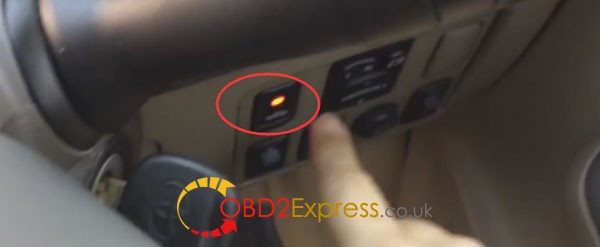
X300-Pro3-Reset-Toyota-G-chip-72-when-all-key-lost-12

Switch ignition off and remove the key, then press ENT
X300-Pro3-Reset-Toyota-G-chip-72-when-all-key-lost-13

X300 Pro3 will prompt you:
For make only 1 key: turn on with new key for 5 seconds then turn on-off 5 times until security light go off.
X300-Pro3-Reset-Toyota-G-chip-72-when-all-key-lost-14

X300-Pro3-Reset-Toyota-G-chip-72-when-all-key-lost-15

X300-Pro3-Reset-Toyota-G-chip-72-when-all-key-lost-16

X300-Pro3-Reset-Toyota-G-chip-72-when-all-key-lost-17

Done! Reset TOYOTA G Chip with key master success!
Now it can start

X300-Pro3-Reset-Toyota-G-chip-72-when-all-key-lost-18


Thursday, 8 December 2016

How to copy VW Polo 2012 key viaJMD assistant & Handy baby

Here is How to do VW Polo 2012 all key lost by JMD assistant & Handy baby key programmer 

This is the new obd adapter JMD assistant
jmd-assistant-handy-baby-do-all-key-lost-1
And the JMD48 chip, and the key to be programmed
jmd-assistant-handy-baby-do-all-key-lost-2
Insert the key to switch and put the chip close to it
jmd-assistant-handy-baby-do-all-key-lost-3
The dashboard status
jmd-assistant-handy-baby-do-all-key-lost-4
Then remove the JMD48 chip away
jmd-assistant-handy-baby-do-all-key-lost-5
Connect the JMD assistant adapter to the OBD port under the dashboard
jmd-assistant-handy-baby-do-all-key-lost-6
The dashboard status
jmd-assistant-handy-baby-do-all-key-lost-7
Disconnect the JMD assistant and put it on the coil of the Handy baby
jmd-assistant-handy-baby-do-all-key-lost-8
Chip transfer
jmd-assistant-handy-baby-do-all-key-lost-9
Chip generate and authorize
jmd-assistant-handy-baby-do-all-key-lost-10
Insert the key and turn to II
jmd-assistant-handy-baby-do-all-key-lost-11
JMD adapter collect data
jmd-assistant-handy-baby-do-all-key-lost-12
Data collection success and put the JMD48 chip
jmd-assistant-handy-baby-do-all-key-lost-13
Copy by JMD48 chip push OK

jmd-assistant-handy-baby-do-all-key-lost-14
jmd-assistant-handy-baby-do-all-key-lost-15
Copy data success!
jmd-assistant-handy-baby-do-all-key-lost-16
Test it on the car and it’s working.

jmd-assistant-handy-baby-do-all-key-lost-17 jmd-assistant-handy-baby-do-all-key-lost-18

Wednesday, 20 July 2016

(fixed) FNR Key Prog 4-in-1 run-time error 8002 invalid port number

Symptom:
Error message “run-time error 8002invalid port number” pops up when installing FNR Key Prog 4-in-1 software for Ford, Renault and Nissan to program new keys.

Solution by obd2express engineers:
First, try on Windows XP system:
http://www.chinaautodiag.com/download/ghost-windows-xp-professional-sp3-free-download.zip
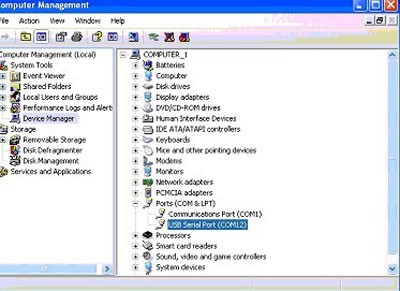
Then, setup the usb com port (com4) to com12
How to install FNR Key Prog 4-in-1 Key Prog for Nissan Ford Renault?
1.Open the “ford install” folder,install the application “fordupdate1.1.1″
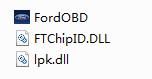
2.Copy the files in the folder “ford crack” to the directory of “TrueCode”.
3.Copy “FORD CODE CALCULATOR” and “Renault nissan” to the directory of “TrueCode”.
4.Copy the file “hid.dll” from folder “et199-nissan-hid”.
5.Connect the dongle with computer,then install the driver from CD.