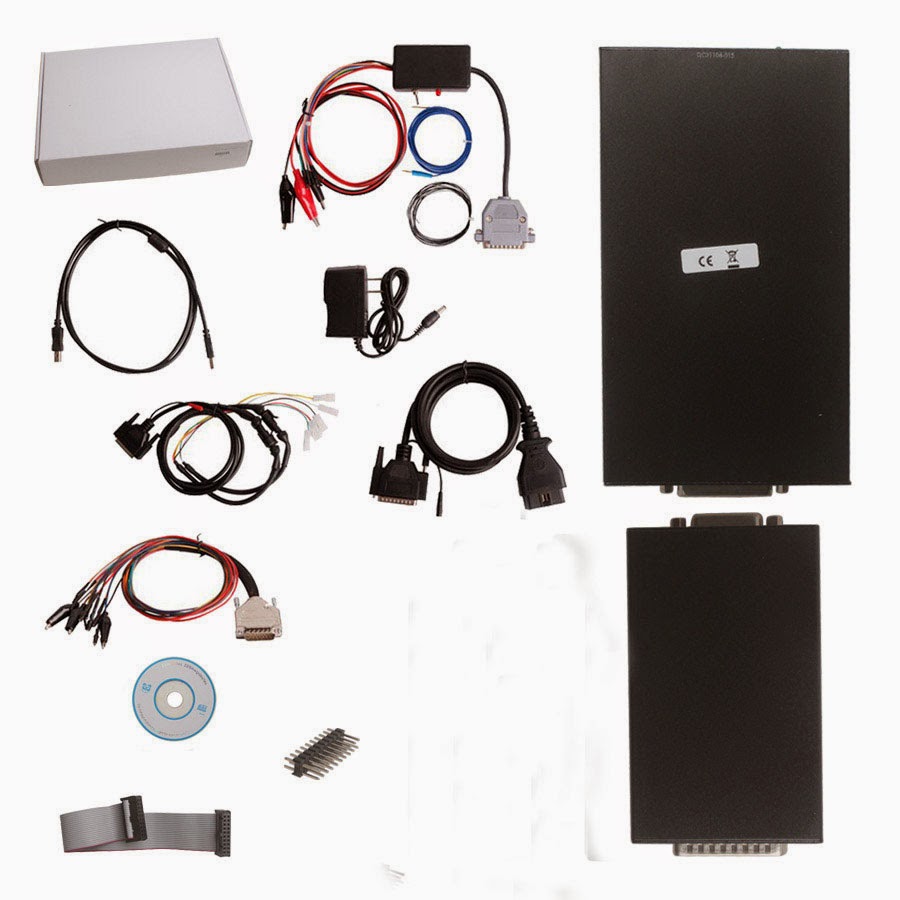
Here is the BMW F-series model list for Ktag v6.070 and Kess V2 v4.036 ECU programmer.
Firmware requirement:
Ktag v6.070 or Kess V2 v4.036
ECU types:
- BOSCH EDC17C56
- BOSCH EDC17C50
-SIMENS MSV80
- BOSCH EDC17CP54
F series list can be done with KTAG & kess v2:
www.mileageprogrammer.com
Showing posts with label kess v2. Show all posts
Wednesday, 25 May 2016
Friday, 25 March 2016
How to solve Kess V2 Bootloader adapter problems
Find a solution to fix Kess v2 clone bootloader adapter problems. Just put it here for sharing.
Device:
Kess v2 with ksuite 4.036 (China clone)
Symptom:
I am having problems with my bootloader adapter for Kess v2. Kess is reworked to 4.036 and works with OBD cable. I tried to use bootloader adapter and cable, but failed to read any ecu. I tried to connect EDC17CP14 (on the bench and without boot pin- obd mode on the bench), no luck with Kess (but my reworked Galletto worked with similar wiring ID + read OK).
I already checked the wiring in the cable connector- fixed some wires, but still nothing.
I think there may be something wrong in the bootloader unit.
4 steps to solve bootloader adapter problems:
Step 1- fixed the wiring
i fixed the wiring in the connector that goes into the bootloader module like in the picture (Ktag has the same) 4 wires were wrong in my connector.
Step 2- resoldered the mosfet
And I resoldered the mosfet (in the middle of the module- near the middle LED).
Step 3- read ECU without opening
I then got the power to the ecu. But it didnt read it, probably because I didn’t connect the boot pin (that needs to be soldered on the ecu pcb). I tried to read it without opening, because I borrowed the ecu.
Step 4- opened the ECU to read
So I finally got the time to test my bootloader module with all wiring (boot cable attached). Once I opened the ECU (edc17cp14) and connected the boot pin, I was able to succesfully Id and read the ECU.
Worked like a charm!
The main problem was the soldering of the mosfet transistor in the middle of bootloader pcb, and I remowed the extra wire that was on the other side of the pcb.
Hope this helps those with Kess V2 unit from China
(NOTE: This is a cutomer solution; please try and responsible for what you will do)
Device:
Kess v2 with ksuite 4.036 (China clone)
Symptom:
I am having problems with my bootloader adapter for Kess v2. Kess is reworked to 4.036 and works with OBD cable. I tried to use bootloader adapter and cable, but failed to read any ecu. I tried to connect EDC17CP14 (on the bench and without boot pin- obd mode on the bench), no luck with Kess (but my reworked Galletto worked with similar wiring ID + read OK).
I already checked the wiring in the cable connector- fixed some wires, but still nothing.
I think there may be something wrong in the bootloader unit.
4 steps to solve bootloader adapter problems:
Step 1- fixed the wiring
i fixed the wiring in the connector that goes into the bootloader module like in the picture (Ktag has the same) 4 wires were wrong in my connector.
Step 2- resoldered the mosfet
And I resoldered the mosfet (in the middle of the module- near the middle LED).
Step 3- read ECU without opening
I then got the power to the ecu. But it didnt read it, probably because I didn’t connect the boot pin (that needs to be soldered on the ecu pcb). I tried to read it without opening, because I borrowed the ecu.
Step 4- opened the ECU to read
So I finally got the time to test my bootloader module with all wiring (boot cable attached). Once I opened the ECU (edc17cp14) and connected the boot pin, I was able to succesfully Id and read the ECU.
Worked like a charm!
The main problem was the soldering of the mosfet transistor in the middle of bootloader pcb, and I remowed the extra wire that was on the other side of the pcb.
Hope this helps those with Kess V2 unit from China
(NOTE: This is a cutomer solution; please try and responsible for what you will do)
Thursday, 10 March 2016
New Genius Ktouch vs. Kess V2 ECU Tuning Tool
Hand-held New Genius & Flash Point has been released for decades. Here, obd2express list the main differences of the two ECU chip tuning tools- hand-held kess v2 and pc-based kess v2.
| Product Name | New Genius/ Ktouch | Best Quality Kess V2 |
|---|---|---|
| Picture | ||
| Language | English, Italian, German, French, Spanish, Portuguese,Hungarian |
English, German, Spanish, Italian, Portuguese, French |
| Software | -- | V2.15 |
| Hardware | V5.05 | V4.036 |
| Tokens | No Tokens Limitation,30 Tokens come with device by default, you can press the tokens reset button on the back of hardware to get new Tokens |
No Tokens Limitation, there is renew button on the main unit. This button is used to charge tokens. Once your tokens run over, just click this button, then tokens will go back to 30 tokens. |
| Update | via hardware | via hardware |
| Support Protocols | CAN-BUS, KWP and J1850 protocols | Line, CAN, EDC17 and MED17 and Ford J1850 |
| Vehicle coverage | Car, Bikes, LCV Support more new vehicle than Kess V2 New Genius vehicle list |
Car and Bike |
| PC | Hand-held, no need PC; software is inside the machine already directly to use PC is needed when modify the data |
PC-based ECU Programmer; you need install the software by yourself |
| OS | Windows XP system | most WIN7 and XP systems |
| Method | Read and Write ECU via OBD2 directly | Read and Write ECU via OBD2 directly |
| Conclusion | 1) Hand-held KESS V2 version- KTouch, more easily and convenient to use 2) Adds more new ECUs than KESS V2 |
|
Wednesday, 25 November 2015
What is the difference for all KESS V2 series
OBDexpress.co.uk is selling a series of kess v2,they have own special features, how to choose the best for your car, what is the difference for all KESS V2 series,Look at the following table:
More information:http://www.obdexpress.co.uk/producttags/kess-v2.html
Tuesday, 31 March 2015
V2.11 KESS V2 FW 4.036 ECU tuning kit unlimited tokens Win 7
Obd2express.co.uk has newly launches latest V2.11 KESS V2 ECU programmer firmware V4.036 with unlimited tokens (31st Mar, 2015).
Software version: V2.11
Firmware version: V4.036
KESS V2 tuning kit V2.11 new features:
1) No need program token chips. No need to buy J-LINK programmer to add tokens anymore.
2) Add latest protocols and ECUs, more detailed cable connection instruction
Language: English, German, Spanish, Italian, Portuguese, French
Operating system: Win XP / Win 7
This software can be used on most XP and win7 system. But if your laptop has other OBD software which is not compatible with this software, please change the laptop or system to install. We recommend customers to use our Win XP operating system.
Protocol: Line, CAN, EDC17 and MED17 and Ford J1850Kess V2
Tips for using KESS V2 V2.11:
1) NO internet connection during software installation. Otherwise, the firmware will be damaged.
2) DOO NOT update the Kess v2 tuning kit firmware / software
3) Disable any-virus software before installing software
4) DO NOT change or flash CPU
5) Install the software strictly following our KESS V2 V2.11 software installation video STEP BY STEP. Otherwise you may get error or the software will not display normally.
How to update KESS V2 FW 3.009 to FW V4.036?
Please send back your KESS V2 main device to our factory The upgrade fee is 95USD per / device You need to order the update service Item No:.. SE87-CS.
Upgrade service only fits KESS V2 'QC number ends with A015, others are invalid.
Package list:
For detail KESS V2 V2.11 vehicle list, please check OBDexpress.co.uk webpage.
Software version: V2.11
Firmware version: V4.036
KESS V2 tuning kit V2.11 new features:
1) No need program token chips. No need to buy J-LINK programmer to add tokens anymore.
2) Add latest protocols and ECUs, more detailed cable connection instruction
Language: English, German, Spanish, Italian, Portuguese, French
Operating system: Win XP / Win 7
This software can be used on most XP and win7 system. But if your laptop has other OBD software which is not compatible with this software, please change the laptop or system to install. We recommend customers to use our Win XP operating system.
Protocol: Line, CAN, EDC17 and MED17 and Ford J1850Kess V2
Tips for using KESS V2 V2.11:
1) NO internet connection during software installation. Otherwise, the firmware will be damaged.
2) DOO NOT update the Kess v2 tuning kit firmware / software
3) Disable any-virus software before installing software
4) DO NOT change or flash CPU
5) Install the software strictly following our KESS V2 V2.11 software installation video STEP BY STEP. Otherwise you may get error or the software will not display normally.
How to update KESS V2 FW 3.009 to FW V4.036?
Please send back your KESS V2 main device to our factory The upgrade fee is 95USD per / device You need to order the update service Item No:.. SE87-CS.
Upgrade service only fits KESS V2 'QC number ends with A015, others are invalid.
Package list:
For detail KESS V2 V2.11 vehicle list, please check OBDexpress.co.uk webpage.
Wednesday, 27 August 2014
Notes for K-TAG(KTAG) ECU programmer
K-TAG
is an ECU programmer which has released to the version V2.06. It
specializes in BDM function. What should be noted when using the K-tag
programmer? Following notes are helpful for owners.

NOTE1
Apart from some common protocols, KTAG ECU programmer also supports BDM MOTOROLA MPC5xx protocol.
NOTE2
K-TAG and KESS V2 share the same software but they are two different product. KESS V2 is able to do OBD function while KTAG can not.
NOTE3
If you find out that K-tag can only read from the slave files but not write. Make sure refer to the ECU programming list instruction. Some ECU can be read but not write, like EDC16 Audi. Others can only be written but not read vice versa.
NOTE4
Tokens are needed when KTAG does ECU programming function. K-TAG programmer comes with 500 tokens. You can buy J-link ARM CPU repair chip to reprogram to get another 500 tokens after use them up.
NOTE5
KTAG comes with AC adapter in the package. You do not need to buy them separately.
NOTE6
Never update K-TAG programmer, otherwise will damage the tool.
NOTE7
Incorrect installation will lead to the error: "Communication error: please check power and connections" (as the picture below), here is the tutorial guide for installation K-TAG software.

http://www.dailymotion.com/video/xum8h5_how-to-use-ktag-k-tag-ecu-programming-tool_auto

NOTE1
Apart from some common protocols, KTAG ECU programmer also supports BDM MOTOROLA MPC5xx protocol.
NOTE2
K-TAG and KESS V2 share the same software but they are two different product. KESS V2 is able to do OBD function while KTAG can not.
NOTE3
If you find out that K-tag can only read from the slave files but not write. Make sure refer to the ECU programming list instruction. Some ECU can be read but not write, like EDC16 Audi. Others can only be written but not read vice versa.
NOTE4
Tokens are needed when KTAG does ECU programming function. K-TAG programmer comes with 500 tokens. You can buy J-link ARM CPU repair chip to reprogram to get another 500 tokens after use them up.
NOTE5
KTAG comes with AC adapter in the package. You do not need to buy them separately.
NOTE6
Never update K-TAG programmer, otherwise will damage the tool.
NOTE7
Incorrect installation will lead to the error: "Communication error: please check power and connections" (as the picture below), here is the tutorial guide for installation K-TAG software.

http://www.dailymotion.com/video/xum8h5_how-to-use-ktag-k-tag-ecu-programming-tool_auto
Subscribe to:
Posts (Atom)