UK SHIP, NO TAX

Sunday, 5 March 2017

Add Key Data To SEC-E9 CNC Step By Step

This instruction is about how to add key date to SEC E9 CNC key cutting machine step-by-step.

Tool Description:

SEC-E9 CNC Automated Key Cutting Machine is able to cut standard keys and high security keys, such as BMW, VW, HONDA, OPEL,etc, SEC-E9 also supports to cut house keys, including dimple keys, tubular keys, single standard keys and motorcycle keys. Ford Tibbe keys and LDV keys are available to cut. SEC-E9 is a good choice for locksmith since you do not need to buy other small key cutting machines for house keys, just need to buy the corresponding clamps for different key types. Moreover, SEC-E9 can cut a new key without original key. It is the main difference from the traditional manual key cutting machine.

How to add date step guide here:

Power on the SEC-E9 key cutter

Click “my key information” button at left bottom on the home page to go to next page.

add-key-data-to-sec-e9-1

Please click “create new” button at right bottom on screen.

add-key-data-to-sec-e9-2

Please pay attention to alerts, and please click “OK” button if you are familiar with details of key

Click input field at upper right, then click the right keyboard button

add-key-data-to-sec-e9-3

Input new needed manufacturers of keys, locks or cars, then click “OK” button
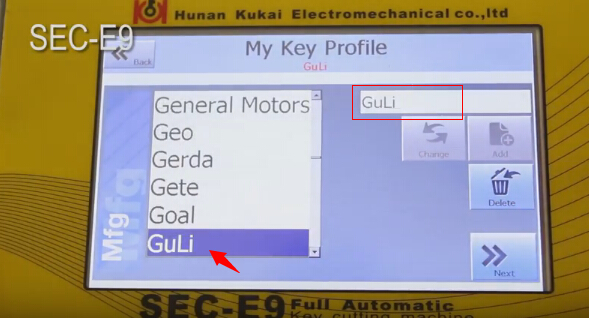
add-key-data-to-sec-e9-4

please click “Add” button to add manufacturer name to left list

Input new needed models of keys, locks or cars

add-key-data-to-sec-e9-5

click “Add” button to add input model to list

Select model you added, then click Next bottom

Then input model production year (Year from and Year to)

add-key-data-to-sec-e9-6

Click “Add new” button

Select the new option and click “select card” button

add-key-data-to-sec-e9-7

Input key information according step by step

add-key-data-to-sec-e9-8

Then select Create & Select button

Then go to next page, you will see a data ID number in list

add-key-data-to-sec-e9-9

Click “Add” button, and it means you finish adding data.

Click “View information” button to view input data.

add-key-data-to-sec-e9-10

Back to SEC-E9 key cutting machine home page and enter “my key information” page, and you will find the added manufacturer and model


add-key-data-to-sec-e9-11

add-key-data-to-sec-e9-12

add-key-data-to-sec-e9-13


You can start to cut keys if the data is correct.

This article support by A leading online exporter of car diagnostic tools official blog:http://blog.obdexpress.co.uk/2017/03/06/add-key-data-to-sec-e9-cnc-key-cutting-machine/


Wednesday, 1 March 2017

How to use Xtool PS2 heavy duty scanner diagnose Daewoo Lacetti 2009

 I managed to read and clear codes myself for my Daewoo, using the Xtool PS2 diagnostic tool. Here, share something..maybe newbies need it…
my model: Daewoo Lacetti 2009

my scanner: i used the heavy duty version, not xtool ps2 gds


my procedure:

connect the VCI and obd connector..then connect to the obd port on my Daewoo

power on the Xtool PS2 heavy duty scanner

xtool-ps2-gds-gm-deawoo (1


select Diagnosis

xtool-ps2-gds-gm-deawoo (2


select American

xtool-ps2-gds-gm-deawoo (3


then select model: GM Daewoo Lacetti 2009; it’s a passenger car

xtool-ps2-gds-gm-deawoo (4

xtool-ps2-gds-gm-deawoo (5

xtool-ps2-gds-gm-deawoo (6

xtool-ps2-gds-gm-deawoo (7

xtool-ps2-gds-gm-deawoo (8

xtool-ps2-gds-gm-deawoo (9

xtool-ps2-gds-gm-deawoo (10

xtool-ps2-gds-gm-deawoo (11


select modules to read

here: i read and clear codes of ECM and BCM

xtool-ps2-gds-gm-deawoo (11

xtool-ps2-gds-gm-deawoo (12

xtool-ps2-gds-gm-deawoo (13

xtool-ps2-gds-gm-deawoo (14

xtool-ps2-gds-gm-deawoo (15

xtool-ps2-gds-gm-deawoo (16

xtool-ps2-gds-gm-deawoo (17

xtool-ps2-gds-gm-deawoo (18


xtool-ps2-gds-gm-deawoo (19

xtool-ps2-gds-gm-deawoo (20


xtool-ps2-gds-gm-deawoo (22

xtool-ps2-gds-gm-deawoo (24


Have fun with Xtool ps2 heavy duty scan tool. it’s worth the money i think

This article support by A leading online exporter of car diagnostic tools :


www.autelshop.com upgrade to www.autelsale.com

Wednesday, 22 February 2017

How To Use VCM 2 Program Ford Fiesta Full Licensed

I finally purchase a vcm2 china clone…. and yesterday did something on the Ford Fiesta MY15… Full licensed programming.

Here is the machine i get and what i did with it
ford-vcm-2

ford-vcm-2-china-clone

I bought the best-quality vcm in the website (http://www.obdexpress.co.uk/)
It cost €175, much more cheaper than the genuine
With the ford ids v98 crack software
And a WIFI card came with it (so works in wireless diagnosis and programming)

Vehicle info here and attach photos of full licensed programming…
Vehicle: Fiesta
Engine type: TIVCT
Capacity: 1.6L
Gearbox: Manual
Fuel type: Petrol
Emission level: All others
(Vehiculo: Fiesta
Tipo de motor: TIVCT
Capacidad: 1.6L
Caja de cambios: Manual
Tipo de combustible: Petrol
Nivel de emisiones: Todos los demas)
  
ford-ids-full-licensed-programming (1

ford-ids-full-licensed-programming (2

ford-ids-full-licensed-programming (3

ford-ids-full-licensed-programming (4

Monday, 13 February 2017

How to program a new key to Honda with Honda HDS scanner

How to program a new key to Honda using a Honda HDS HIM diagnostic tool (supporting basic diagnostics, programming incl. VIN reading & Immo programming)... For details, here you go...to program honda key transponder.

To add one new key/Keyless transmitter, you need:
  1. Immobilizer Mater Key Blank or Immobilizer Valet Key Blank
    2. One programmed ignition key (master or valet) for the vehicle
    3. Vehicle key code
    4. PCM code
  2. Honda HDS HIM diagnostic tool with immobilizer programming software
HDS 3.101.015 (!! cheap honda hds cable only for diagnosis)
The HDS is required for registration of the immobilizer keys. Programming the immobilizer also programs the keyless transmitter.
Use the HDS with Honda key blacks to add a key or keyless control unit, storing the transponder code of the new key in the memory of the control unit.
  1. Condor XC-MINI key cutting machine
NOTE:
Make sure the market, the date, and the time on the HDS setup screen are correct.
Select the F12 key in the upper right corner to get the Set-up Details screen.
Make sure Market is set to USA.
Select the time display in the lower right corner to get the Date/Time Properties pop-up window.

How to program a new key to Honda with Honda HDS scanner:
1) Use an appropriate key blank and the key cutting machine to cut a new ignition key.
2) Connect the Honda HIM diagnostic system with vehicle via OBD socket
3) Insert a programmed ignition key into the ignition switch
4) Turn ignition ON
5) Run Honda diagnostic system personal computer (pc) software and come to iN screen
6) At the screen prompts, enter the VIN and the odometer reading, then verify the correct date and time.
7) Select “IMMOBI” from “System Selection” Menu
8) Select “Immobilizer Setup” from “Immobilizer Test Mode” Menu
9) Select Add and Delete Keys
10) Select Add 1 Key
11) Select Begin to Add 1 Key
12) Follow the HDS screen prompts, if your HDS is not logged in to the iN, you willhave to enter the PCM code you have retrieved from the iN Immobilizer Code Inquiry to proceed.
13) When adding keys procedure completed, turn ignition OFF
14) Exit HDS software and disconnect Honda HIM HDS scan tool from the vehicle


P.s. This is the Honda HDS pocket tester in use.
Honda-HDS-Key-Programming (1) Honda-HDS-Key-Programming (2)

Sunday, 12 February 2017

How to read and program BMW CAS4 key?


This tutorial of 2011 BMW 525 CAS4 reading by VVDI prog programmer and key programming by Xhorse VVDI2 commander
vvdi2-vvdiprog-bmw-cas4

Car: BMW 525 2011
Eeprom: CAS4 01L15Y

vvdi2-bmw-cas4

You need have a working bmw cas4 programmer and a good bmw key programmer.
Here: vvdi prog to read cas4 & vvdi2 to program a new key

Step 1 VVDI Prog read BCM
Select type: 4-immobilizer, brand: BMW, type: CAS4-1L15Y
bmw-cas4-reading-key-programming-by-vvdi2-vvdiprog (1)

Click on Connection Diagram
Connect the MC9S12 adapter to the BCM
bmw-cas4-reading-key-programming-by-vvdi2-vvdiprog (2)

bmw-cas4-reading-key-programming-by-vvdi2-vvdiprog (3)

Remove the component and solder back after the operation is complete
bmw-cas4-reading-key-programming-by-vvdi2-vvdiprog (4)

Read CAS4 1L15Y
bmw-cas4-reading-key-programming-by-vvdi2-vvdiprog (5

Operation success!
bmw-cas4-reading-key-programming-by-vvdi2-vvdiprog (6

Then save the bin file


Step 2 VVDI2 bmw make dealer key
Open VVDI 2 Quick Start
Go to vvdi BMW
bmw-cas4-reading-key-programming-by-vvdi2-vvdiprog (7

Select Key Learn-> File make key
bmw-cas4-reading-key-programming-by-vvdi2-vvdiprog (8

Select Type: CAS4 1L15Y
bmw-cas4-reading-key-programming-by-vvdi2-vvdiprog (9

Load the EEPROM dump file: open the bin file (read by vvdi prog)
bmw-cas4-reading-key-programming-by-vvdi2-vvdiprog (10

Note the remote frequency, then select Key ID7


bmw-cas4-reading-key-programming-by-vvdi2-vvdiprog (11


Make dealer key
bmw-cas4-reading-key-programming-by-vvdi2-vvdiprog (12

Note: preparing dealer key needs about 30 minutes; the windows may be false read. Please wait for the end. Input the new key to the programmer, then continue.
bmw-cas4-reading-key-programming-by-vvdi2-vvdiprog (13

Write the key successfully!
Go to the car with the key. No need to write back eeprom.
bmw-cas4-reading-key-programming-by-vvdi2-vvdiprog (14

bmw-cas4-reading-key-programming-by-vvdi2-vvdiprog (15

Done!