UK SHIP, NO TAX

Thursday, 2 April 2015

Powerful Xtool SP2 Truck Diagnostic Tool

Professional Xtool PS2 is really an expert truck diagnostic tool, whose diagnostic ability is superior to the common used ARM7 chip. Excellent performance of chip and superior diagnostic module confirm the accuracy and real-time function.

Xtool SP2 truck diagnostic tool highlights will be listed below that make this powerful truck diagnostic tool more remarkable than the commons:

1. Support universal protocols;
With built-in CAN BUS chip, PS2 will not only support all protocols and modes for OBD II, but also support all CAN BUS agreements.

2. Support update online on Xtool official website;
You can update the software via internet anytime anywhere you like.

3. Wireless communication;
Wireless communication will make your diagnostic work more convenient.

Obd2express additionally provides you with full technical support that will help much to your diagnostic work, please check as follows:

Supported Truck Models Manufacturers:

European: VOLVO, SCANIA, MAN, MERCEDES BENZ, MACK, ADF, IVECO, ERF, ASTRA, BREMACH, RENAULT;
Asian: ISUZU, HINO, FUSO, HYUNDAI, KIA, UD;
USA: CAT, CUMMINS, DETROIT;
Chinese: YUTONG, SHAANXI, SANY, KINGLONG, SINOTRUCK, JAC, FAW, DONGFENG, BEIBEN, WECHIAI POWER;

PDF File for PS2 Diagnostic Tool:
PS2 diagnostic tool test function list
Astra test function list
Benz test function list
Cummins test function

Wednesday, 1 April 2015

Toyota MVCI Operation on Windows 8 Quick Guide

Original Xhorse MVCI 3 IN 1 V10.00.028 for Toyota TIS, Honda HDS and Volvo DICE is especially high-performance factory diagnostics for Toyota TIS, supporting Toyota, Lexus and Scion vehicles over the J1962 DLC3 connector.

The main files of interest on the CD are "MVCI Driver for TOYOTA" and "Toyota Techstream 10.00.028". Reading the instructions it required me to install the MVCI driver followed by the Techstream software.

The MVCI driver repeatedly failed to install so after a quick search it appeared that other people also had this issue when using 64 bit versions of Windows 7, I was running 64 bit Windows 8. The solution was very simple are required manually extracting the MVCI driver , I used 7 zip which worked very well but there are many other applications that will extract this installer The steps are as follows.:
(Note: I do not response for the result; I just tested the solution to be workable)

1. Create the folder C: \ Program Files (x86) \ Xhorse Electronics \ MVCI Driver for Toyota TIS
2. Open the file MVCI Driver for TOYOTA.msi with 7zip and extract to the folder you created.
3. Browse to the folder with Windows Explorer.
4. Right click on the file ftdiport.inf and select install.
5. Right click on the file ftdibus.inf and select install.

Connect the Mini VCI interface and run the application FirmwareUpdateTool and click the Device Info button. If your device is showing as connected then it is ready to be used with Techstream.

Tuesday, 31 March 2015

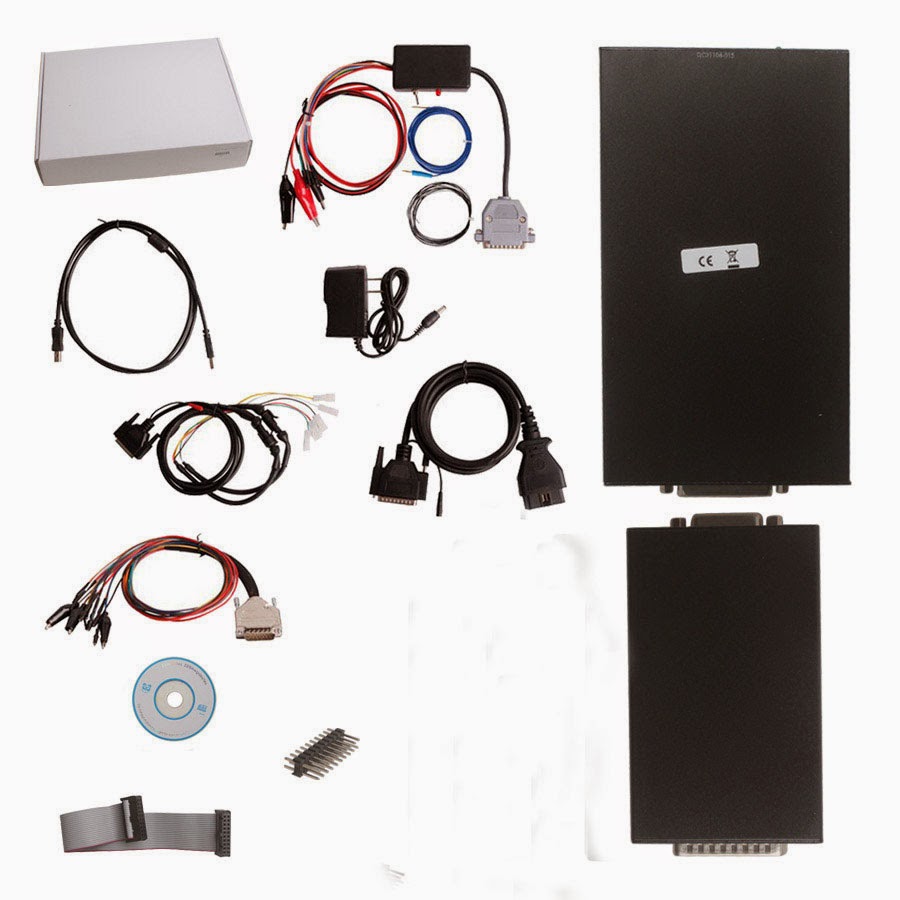
V2.11 KESS V2 FW 4.036 ECU tuning kit unlimited tokens Win 7

Obd2express.co.uk has newly launches latest V2.11 KESS V2 ECU programmer firmware V4.036 with unlimited tokens (31st Mar, 2015).

Software version: V2.11

Firmware version: V4.036


KESS V2 tuning kit V2.11 new features:
1) No need program token chips. No need to buy J-LINK programmer to add tokens anymore.
2) Add latest protocols and ECUs, more detailed cable connection instruction

Language: English, German, Spanish, Italian, Portuguese, French

Operating system: Win XP / Win 7

This software can be used on most XP and win7 system. But if your laptop has other OBD software which is not compatible with this software, please change the laptop or system to install. We recommend customers to use our Win XP operating system.

Protocol: Line, CAN, EDC17 and MED17 and Ford J1850Kess V2

Tips for using KESS V2 V2.11:
1) NO internet connection during software installation. Otherwise, the firmware will be damaged.
2) DOO NOT update the Kess v2 tuning kit firmware / software
3) Disable any-virus software before installing software
4) DO NOT change or flash CPU
5) Install the software strictly following our KESS V2 V2.11 software installation video STEP BY STEP. Otherwise you may get error or the software will not display normally.

How to update KESS V2 FW 3.009 to FW V4.036?
Please send back your KESS V2 main device to our factory The upgrade fee is 95USD per / device You need to order the update service Item No:.. SE87-CS.

Upgrade service only fits KESS V2 'QC number ends with A015, others are invalid.

Package list:

For detail KESS V2 V2.11 vehicle list, please check OBDexpress.co.uk webpage.

Monday, 30 March 2015

Difference among all digiprog 3 Odometer Programmer From Obd2express.co.uk

As the universal odometer programmer, digiprog 3 is welcomed by a lot of customers. Now it newly release the 4.94 software, add more car models on the basic of V4.88. which supports multi-language and full range or vehicle.
In order to allow people to better understand them, OBDexpress.co.uk engineer make a comparison table as follows.
Item NoSM47SM47-BSM47-DSM47-ESM47-F
Product NameV4.94 Digiprog IIIMaster ProgrammerMain UnitWith OBD2 CableV4.94 DigiprogIII Entire KitV4.94 DigiprogIII Entire KitMain Unit Of V4.94With OBD2 Cable
SoftwareV4.94V4.94V4.94V4.94V4.94
LanguageMulti-languageMulti-languageMulti-language.Multi-languageMulti-language
Power password11111
ManufacturerSM47 and SM47-B madeby same manufacturerSM47-D and SM47DZmade by samemanufacturerSM47-E and SM47-Fmade by same manufacturer
PackageFull package withST01 and ST04 cableMain unit andOBD2 cableFull packageFull packageMain unit andOBD2 cable
UpdateVia EmailVia EmailVia EmailSend main unit backSend main unit back
Vehicle coverageComprehensiveVehicle coverage may slightly different from different manufacturers
Odometer wayThe same as SM33 series, some need to dissemble the dashboard, some via OBD.Follow the system prompts.
More Odometer correction tool at: http://www.obdexpress.co.uk/wholesale/odometer-correction-tool/

Thursday, 26 March 2015

Best Quality Wireless MDI Multiple Diagnostic Interface for GM

As we all know, that many people use GM Tech2 for GM cars,and people are talking about it in many forums,such as corvetteforum, saabcentral.com forum. but also have customer ask us about GM MDI, they find this new tool for GM car, so here I want to talk about GM MDI Scanner.
Best Quality MDI Multiple Diagnostic Interface for GM is made up by original chips, With GDS2 diagnostic system, it supports online programming, wireless communication and so on. With original chip, you can use this together with original software.
1) Multi-language: English, French, German, Japanese, Italian and so on. Total 30 languages to choose. For detailed language, please see the software screen shot
gm-mdi-multiple-diagnostic-interface-original-chip-software-photo-shown
2) Best quality version. Made by the new original chip. More steady than other version.
3) Support original factory latest software
Our GM MDI has the software in the package. You can install our software on the laptop. If you have original software, you can use our hardware with your original software too.
4) Wireless function
GM MDI support communicate with the car by cable and wireless.
5) Online and offline programming function
Support programming online. With European Chevetl Global tis, Supports European Chevetl offline programming.
6) Free license
License is included in our software, it is free for lifelong. We provide free activation also.
Attention: DO NOT UPDATE the software online.
For more FAQs and functions, you can check here.
Best Quality GM MDI Reviews: http://www.obdexpress.co.uk/reviews/pro2303

Monday, 23 March 2015

Reset BMW E46 airbag light with Autel Maxidiag Elite MD802 scanner

Original Autel MaxiDiag Elite MB802 all system plus data stream (DS) function OBD2 scan tool is able to  read and clear DTCs on either the basic 4 systems (engine, transmission, ABS and airbag) or all the systems. Here is the step-by-step instruction on disable BMW E46 airbags with autel md802 elite.
Vehicle symptom:
Red airbag SRS indicator light flashes on BMW E46 dashboard
Indexing of airbags disabling:
Connect the Autel md802 maxidiag elite scan tool with vehicle via OBD socket
Power up the device
Select “Scan” icon on the main screen
Select vehicle region: European /Asia or USA
autel-maxidiag-elite-md802-scanner-1
Select car make: BMW
autel-maxidiag-elite-md802-scanner-2
Select vehicle model series: 3 series>>E46
autel-maxidiag-elite-md802-scanner-3
Wait until the Elite MD802 system build well communication vehicle
The MD 802 scanner will automatically read the vehicle model and version information
autel-maxidiag-elite-md802-scanner-4
There are two main function options: “Auto scan” and “Control unit”. Select “Control unit”
Select “Body” control unit
autel-maxidiag-elite-md802-scanner-5
Select “MRS Multiple Restrain System III/I” by pull down the list
autel-maxidiag-elite-md802-scanner-6
Select “Read Codes” in the next screen
The system will display the fault code and cause information. You can see from the screen that two error codes are stored in ECU.
autel-maxidiag-elite-md802-scanner-7
Select “Erase Codes”
Click “Yes” when system pops up “DTCs and Freeze data will be lost” message
Check the SRS indicator on dashboard, if the airbags light does not go out, repeat Read and Erase fault codes, it will be work.
Disconnect the Autel MD802 scan tool from vehicle.
autel-maxidiag-elite-md802-scanner-8

Friday, 20 March 2015

Newest MPPS V16.1.02 Software Installation Guide

Newest MPPS V16.1.02 is professional ecu chip tuning tool, it is completely working through obd2 port, no need soldering or connecting cables, easy and high efficiency.
Here show you the whole process on how to install the newest MPPS V16.1.02 ECU Chip Tuning software:
Note: Please use Windows XP and Select American English (You should check first before installation).
1. Unzip “MPPS V16.1.02”;
2. Copy the file “MPPS” into Disk C:\;
3. Open MPPS file and send “MPPS” to the desktop;
MPPS-V16.1.02-Software-1
4. Open “Found New Hardware Wizard” and click the second choice (red mark at picture below), and then click “Next”;
MPPS-V16.1.02-Software-2
5. Select saving directory for your hardware (shown at the following picture) and click “Next”;
MPPS-V16.1.02-Software-3
6. Installation done, you can run MPPS V16.1.02 software (software display shown at picture below);
MPPS-V16.1.02-Software-4
Attention: If you buy MPPS ECU chip tuning tool on Obd2express, you can contact customer service to get this newest V16.1.02 software.
Video guide: https://www.youtube.com/watch?v=cBn0E952ZsQ