UK SHIP, NO TAX

Tuesday, 7 March 2017

GM Tech 2 scanner rental?

The original Tech 2 scan tool is too expensive for you? Want a Tech 2 scanner rental for use? If so, Tech 2 clone should be a good choice for you because of the flowing reasons:

– clone tech 2 for sale: $200-$350 around, much more cheaper than the genuine
– the same functions as the genuine: diagnosis, service programming system (SPS), key programming…

GM Tech 2 for sale:
GM-Tech2

Tech 2 clone problems: clone vs original?
Left -clone; right -real
clone-geniune-gm-tech2 (9) clone-geniune-gm-tech2 (10) clone-geniune-gm-tech2 (11) clone-geniune-gm-tech2 (12 clone-geniune-gm-tech2 (13 clone-geniune-gm-tech2 (14 clone-geniune-gm-tech2 (15 clone-geniune-gm-tech2 (16 clone-geniune-gm-tech2 (18 clone-geniune-gm-tech2 (19 clone-geniune-gm-tech2 (20

Tech 2 clone problems: which tech 2 clone is the best?
There are many versions of tech 2 programmer clones from China.
 GM Saab Opel Suzuki Holden Isuzu tech 2 for sale
Item No.WeightCard incl.PackageQualityHot SellingAll Tech2 scanners come with the Same function
SP23-B and SP23-B3 have the best quality; but
SP23-B3 comes with a better box (carton)
SP23-B33.15 KGC Card (SO22-C)Carton BoxBest & Hottest★★★★★
SP23-B9.10 KGC Card (SO22-C)Carry Plastic BoxBest★★★★★
SP23-C9.10 KGC Card (SO22-C)Carry Plastic BoxGood★★★★
SP239.10 KGD Card (SO22-D)Carry Plastic BoxGood★★★
SP23-14.55 KGD Card (SO22-D)Carton BoxBest Price★★★★★
After Sale Service: One Year!! Enough Stock Ready Ship!


Tech 2 clone problems: the best solution of GM diagnostics?
Tech 2 clone or VCDIAG VCX NANO GM or MDI?
How to choose a good GM scan tool for diagnostics & programming?)
GM MDI vs VXDIAG NANO GM vs Tech 2 scan tool
ProductsGM MDIVXDIAG VCX NANO GMTech 2 clone
Picture GM-MDI VXDIAG-VCX-NANO-GM GM-Tech2
softwareGDS 2 (2011)
Tech2 Win
GDS 2 (2014)

TIS2000
SPS
Need computerYes, it’s PC-based.Yes, it’s PC-based.Basic diagnostics: on-board
TIS2000: PC-based
System
requirement
Package software: Win XP only
v2016.11 software: Win 7
Win7 64bit / 32 bit
Win8 64bit
Win XP for TIS2000
LanguageMulti-LanguageMulti-LanguageMulti-Language
(depends on vehicles)
WIFIWIFIYES, VXDIAG GM has WIFIversion and wired version (USB connection)No, only wired connection.
UpdateFirmware updatableFirmware updatable
Software updatable
Update via 32MB Card
ActivationYes, MDI need activation.No need to activateNo need to activate
Diagnosiswireless basic diagnosticbrand-specific diagnosisbasic diagnosis
Programming-wireless onlineprogramming
–offline programming ,such as European Chevrolet, Opel, but not for all cars
GM TIS2WEB online Service Programming System (SPS)Offline programming with TIS2000 on SAAB/OPEL (-2008)
Supported protocolsUART, Class 2, KWP2000 and GMLAN (CAN) CAN, UART, KW2000, Class2, GM LAN, etc.CANdi interface(NOTE 1)
Supported vehiclesvehicles from 1990-2014
GM,
Opel,
Chevrolet,
Saab,
Australia Holden (2010-2012)
Vehicles to 2015
GM,
OPEL
vehicles from 1992-2013
GM,
SAAB,
OPEL,
UZUKI,
ISUZU,
Holden
Advantage-can support software from original factory
-support offline & online programming
-cheap but with the same function as GM MDI
– WIFI and USB connection
-good for new cars

-cannot plug original software card, but can support original program
-easy to carry on
ConclusionVXDDIAG VCX NANO GM wins!!!!!!!!!!!!!!

Gm tech 2 software for pc:
tech2web
tech2win

Sunday, 5 March 2017

Add Key Data To SEC-E9 CNC Step By Step

This instruction is about how to add key date to SEC E9 CNC key cutting machine step-by-step.

Tool Description:

SEC-E9 CNC Automated Key Cutting Machine is able to cut standard keys and high security keys, such as BMW, VW, HONDA, OPEL,etc, SEC-E9 also supports to cut house keys, including dimple keys, tubular keys, single standard keys and motorcycle keys. Ford Tibbe keys and LDV keys are available to cut. SEC-E9 is a good choice for locksmith since you do not need to buy other small key cutting machines for house keys, just need to buy the corresponding clamps for different key types. Moreover, SEC-E9 can cut a new key without original key. It is the main difference from the traditional manual key cutting machine.

How to add date step guide here:

Power on the SEC-E9 key cutter

Click “my key information” button at left bottom on the home page to go to next page.

add-key-data-to-sec-e9-1

Please click “create new” button at right bottom on screen.

add-key-data-to-sec-e9-2

Please pay attention to alerts, and please click “OK” button if you are familiar with details of key

Click input field at upper right, then click the right keyboard button

add-key-data-to-sec-e9-3

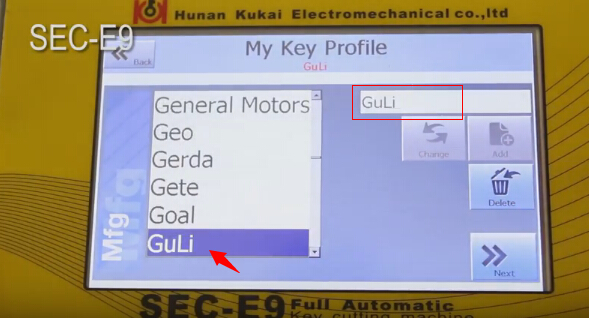
Input new needed manufacturers of keys, locks or cars, then click “OK” button
add-key-data-to-sec-e9-4

please click “Add” button to add manufacturer name to left list

Input new needed models of keys, locks or cars

add-key-data-to-sec-e9-5

click “Add” button to add input model to list

Select model you added, then click Next bottom

Then input model production year (Year from and Year to)

add-key-data-to-sec-e9-6

Click “Add new” button

Select the new option and click “select card” button

add-key-data-to-sec-e9-7

Input key information according step by step

add-key-data-to-sec-e9-8

Then select Create & Select button

Then go to next page, you will see a data ID number in list

add-key-data-to-sec-e9-9

Click “Add” button, and it means you finish adding data.

Click “View information” button to view input data.

add-key-data-to-sec-e9-10

Back to SEC-E9 key cutting machine home page and enter “my key information” page, and you will find the added manufacturer and model


add-key-data-to-sec-e9-11

add-key-data-to-sec-e9-12

add-key-data-to-sec-e9-13


You can start to cut keys if the data is correct.

This article support by A leading online exporter of car diagnostic tools official blog:http://blog.obdexpress.co.uk/2017/03/06/add-key-data-to-sec-e9-cnc-key-cutting-machine/


Wednesday, 1 March 2017

How to use Xtool PS2 heavy duty scanner diagnose Daewoo Lacetti 2009

 I managed to read and clear codes myself for my Daewoo, using the Xtool PS2 diagnostic tool. Here, share something..maybe newbies need it…
my model: Daewoo Lacetti 2009

my scanner: i used the heavy duty version, not xtool ps2 gds


my procedure:

connect the VCI and obd connector..then connect to the obd port on my Daewoo

power on the Xtool PS2 heavy duty scanner

xtool-ps2-gds-gm-deawoo (1


select Diagnosis

xtool-ps2-gds-gm-deawoo (2


select American

xtool-ps2-gds-gm-deawoo (3


then select model: GM Daewoo Lacetti 2009; it’s a passenger car

xtool-ps2-gds-gm-deawoo (4

xtool-ps2-gds-gm-deawoo (5

xtool-ps2-gds-gm-deawoo (6

xtool-ps2-gds-gm-deawoo (7

xtool-ps2-gds-gm-deawoo (8

xtool-ps2-gds-gm-deawoo (9

xtool-ps2-gds-gm-deawoo (10

xtool-ps2-gds-gm-deawoo (11


select modules to read

here: i read and clear codes of ECM and BCM

xtool-ps2-gds-gm-deawoo (11

xtool-ps2-gds-gm-deawoo (12

xtool-ps2-gds-gm-deawoo (13

xtool-ps2-gds-gm-deawoo (14

xtool-ps2-gds-gm-deawoo (15

xtool-ps2-gds-gm-deawoo (16

xtool-ps2-gds-gm-deawoo (17

xtool-ps2-gds-gm-deawoo (18


xtool-ps2-gds-gm-deawoo (19

xtool-ps2-gds-gm-deawoo (20


xtool-ps2-gds-gm-deawoo (22

xtool-ps2-gds-gm-deawoo (24


Have fun with Xtool ps2 heavy duty scan tool. it’s worth the money i think

This article support by A leading online exporter of car diagnostic tools :


www.autelshop.com upgrade to www.autelsale.com