UK SHIP, NO TAX

Sunday, 17 July 2016

Tango Key Programmer Update to V1.106 adds more free software

Tango Key Programmer Update to V1.106 adds more free software in obdexpress.co.uk,and free software listed below:

Tango V1.106 Update Software List (for Free):
[+] Techtream calculator: v9.30, v10.10
[+] Key maker Citroen Jumper 2012-(95640,HITAG)*
[+] Key maker Isuzu NPR 2007-(93C56,HITAG)
[+] Key maker Peugeot 206 2001- (95160,HITAG)
[+] Key maker Peugeot Partner 2002- (95160,HITAG)
[+] Image generator Chevrolet Spark (ID8E)
[+] Cloning of Toyota and Subaru 80 bit Keys**
[+] Added transponders CN2, CN5 to the Clone mode

How to distinguish the original and copy Tango Key Programmer?
Our Tango is original. For original device, there is the serial number. You can use this serial number to register your information on official website, then download the latest software to update your device online.

Update: This one is original. You need to update it when new software release.

Attention: After generating a new transponder with TANGO Programmer, you will not need any additional diagnostic equipment to program the generated transponder to the car! It will start the car directly, even on new FIAT CODE 2 system, also used in PSA Group vehicles! Only you have to write the new file back into the immobilizer system!

How to update Tango programmer to latest version:
1) Go to help option
2) Click online update
List of supported transponders:

Philips transponders:
PCF7930-31 writing, reading
PCF7935 writing, reading, shadow memory, crypto calculator
PCF7936 writing, reading, modes password, crypto, Manchester & Biphase encodings
PCF7941 transponder, remote, eeprom, Manchester & Biphase encodings
PCF7942 transponder, remote, eeprom, Manchester & Biphase encodings
PCF7943 transponder, remote, Manchester & Biphase encodings
PCF7944 transponder, remote, eeprom, Manchester & Biphase encodings
PCF7945 transponder, remote, eeprom, Manchester & Biphase encodings
PCF7946 transponder, remote, Manchester & Biphase encodings
PCF7947 transponder, remote, eeprom, Manchester & Biphase encodings
PCF7952 transponder, remote, eeprom, Manchester & Biphase encodings
PCF7961 transponder, remote, Manchester & Biphase encodings
*Auto switching between PCF7936-PCF7961 windows if invalid type detected.
*Autodetect manchester / biphase

Temic transponders:
Temic 11 reading , writing to T5
Temic 12 reading , writing to T5

Megamos transponders:
Megamos (13) reading , writing to T5 , emulating on PCF7930-35
Megamos (48) reading, writing, PIN, unlock by PIN, full range of memory contents, crypto calculation
Megamos CRYPTO-2 (8E) read ID, read/write EEPROM, write Cryptokey

Texas transponders:
Tiris (4C) reading
Tiris (4D) DST crypto reading, writing, crypto calculator
Tiris (4E) DST crypto reading, writing, crypto calculator
Tiris (8C) reading

Atmel:
TK5551M (T5 replacement)
SAAB reading , writing to T5
The product is in working out stages, therefore the list of the supported transponders will be developed later.

http://www.obdexpress.co.uk/wholesale/tango-key-programmer-with-basic-software.html

Wednesday, 13 July 2016

WIFI MB SD Connect C5 Same Function as SD C4 for Cars/Trucks

MB SD Connect Compact 5 performs the same function as MB SD Connect C4 with newer design. MB SD C5 supports both cars and trucks,Supports wireless connection, Supports Offline and Online Programming.
Top 4 Reasons to Get MB SD Connect Compact 5:
1. Support Wireless
2. Supported Multi-Language: English/Bulgarian/Danish/Greek/Spanish/French/Italian/Korean/Polish/Romanuan/Serbo-Croatian/Turkish/Czech/German/Finish/Hyngarian/Japanese/Dutch/Portuguese/Russian/Swedish/Chinese
3. Support Mercedes Benz Cars After Year 2000
4. Support Offline and Online Programming, If You Want to Do Online, Please Buy This Online SCN Coding Service.

New MB Compact 5 Features:
1. New MB SD Connect Compact 5 Star Diagnosis support wireless diagnose;
2. New MB SD Connect Compact 5 Star Diagnosis not only support K line diagnose and CAN BUS, but also UDS diagnose protocol. Because old MB STAR C4 main board do not have UDS chip, so old MB STAR C4 can not support it;
3. Multiplexer now use Lan cable to connect
4. Connector adopt Military quick swap technology, it can support 10,000 times pull plug, more stable;
5. All core accosseries adopt original new packing chip, and 24hours test, guarantee the quality of the products

SD Connect C5 Supported System:
ENGINE, automatic transmission, air conditioning system, SRS, ABS and ASR, MPL, GM, Benz original security DASX system, KEYZESS GO system and OBD II system, etc.

MB SD Connect C5 Test Function:
Read the fault code, clear fault codes, dynamic data flow, computer programming matching, personalized Settings, component test and maintenance of information consultation, component location map, the circuit diagram.
DAS: selfdiagnosis system with concise interface, clear operation method, makes the query failure, the major detection system is so agile and accurate

Software includes:(Version: 2015.12)
1. D-A-S / Xentry 2015.12 : the automatically Diagnosis Assistance System ,Concise interface and straightforward operation with IB M high-quality computer can realize the quick and accurate code reading and the whole car system testing
2. W-I-S net 2015.12: Workshop Information System Supply the whole view of the wiring diagram in a car,component location diagram and maintenance method. What you do is to enter the chassis number, and then you will get the manufacture data, engine configuration and the car model -all in detail.
3. EPC.net : Electronic Parts Catalog
4. ST Finder 2008:Part location finder
5. STARUTILITIES : the movement management system and self-test
6, SDMEDIA 2014
7, PL69

MB SD Connect C5 vs. SD Connect C4
1. The host communication connection end USES from design, to avoid inadvertently fall in the normal use of the communication port to connect and communication failure, etc.
2. DC 12 v power supply design/host upgrades to avoid the battery installation/battery voltage instability/host can’t enter the shutdown state, etc, caused by the motherboard and rapid  aging of the battery.
3. The host CPU radiator surface and perfectly fit alloy shell, good heat dissipation effect. Equipment running smoothly, don’t crash.
4. The host USES the tamper clasp, should to avoid fragile warranty sticker damage caused by the warranty disputes.
5. Host wi-fi protected the upgrade for PC plastic shell, solid quality does not affect the wi-fi signal.
6. OBD main telecommunication lines connected to the host end upgraded to VGA15 industrial-grade connector.
7. Network upgrade for gigabit connections/pure copper wire core/double layer aluminum foil/woven mesh/silica insulation material. Gigabit communication Against interference/pulling  open circuit / / fracture in low temperature.

PCB Board display:


http://www.mbstartool.com/service/mbstarshop-2016-black-friday-promotion-12171.html

Sunday, 10 July 2016

TCS-CDP pro clone can't read BMW ECU [user solution]

I have recently purchased new TSC-CDP pro from China. Software supplied with its softwware 2014 release 2. The software installed and activated OK. i tested the unit and it passed the test OK; but unluckily, it does not communicate with any car... only use USB cable ( not bothered with Bluetooth). After vehicle selection, the system cannot read ECUs and generates silly error messages "Vehicle not responding (Fahrzeug antwortet nicht)".

Error message:
Startup
Initiation of the tester... YES
Searching for the interface... YES
Establish communication... NO
(ISO 157656-4, SAW J1939-21)
Vehicle not responding
The vehicle is not responding to the diagnosis inquiry made. Please make sure that the tester is correctly connected to the vehicle and that the ignition is turned on, and try again to establish communication. If communication fails again, it is possible that the diagnosis function is not supported.
Software:
2014 release 2.
The software installed and activated OK...and tested the unit and it passed the test OK
Hardware: (new VCI), Serial No.100251, eOBD 114, Firmware version 1423.
* First modification- FAILED!
I tested on Mercs and BMW. I opened the CDP unit and observed that two boards are not connected correctly. So, I pushed them together. This has improved a bit, as the unit now makes a clicking noise when connected to a car. Even can read the VIN, but on BMW failed to read the ECU. I will try later on a different car. But this is already a bad news (no BMWs).

Then, I contacted the supplier and was informed that this TCS-CDP DOES NOT WORK with BMWs and Mercedes cars !!!!!

* Second modification- FAILED!
Then i was told that "the device actually does not work on any vehicle that uses SAE J1850 (PWM and VPW) because it has a fake OKI m6636 or it does not have it at all... The OKI chip is only for cars that support the PWM/VPWM protocol like Ford. BMW didn't use the PWM/VPWM protocol." And this user did fix the problem and used the same interface for all BMW cars..TCS CDP interface, removed from old devices like tv´s, radio´s etc. check all solder Joints of all components (especially relays)..

But I didn’t try that, and decided to purchase another TCS CDP from a different supplier. White this time... When it arrived I tested it immediately on the same BMW 7 E66… and guess what …. Same problems remained.
New TCS CDP white:
***** Third modification- Successfully SOLVED finally!
the problem with the m6636 is in the cdp pro, not in cdp+. replace the 2 diodes (D701 and D703) with 1n4148. back the pcb.
Then gained the communication with BMW car which I could not communicate with before.
So, well DONE!

Ps. To avoid problems above, i recommend you all to buy the OK version as my friend used, without any issues so far. you can see his PCB below. He bought this from
http://www.obdexpress.co.uk/wholesale/tcs-cdp-pro-diagnostic-bluetooth-a.html
It is said that it’s the best clone CDP from China

(someone also said a 100% solution in mhhauto forum:
have to install
Microsoft .NET Framework 3.5
and
Microsoft .NET Framework 3.5 Service Pack 1
and all is 100%

But i didn’t tru it. Maybe it works!

TCS CDP pro+ installation reference: http://blog.obdexpress.co.uk/2016/06/29/how-to-install-tsc-cdp-pro-2015r3/

Wednesday, 6 July 2016

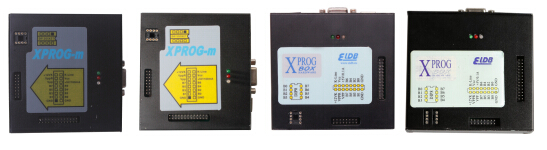
Xprog-m v5.5 & Xprog box v5.6, which better?

Xprog m v5.5.5 nowadays is updated to Xprog-m box 5.6.0. And some differences definitely gonna happen, like some new chips and functions are newly added to Xprog v5.6.

all versions of Xprog m from v5.0 to v5.6:
Xprog-m v5.0     Xprog v5.3 plus     xprog 5.5.5     xprog box v5.60
For detailed differences, refer to
http://obd2-diag.blogspot.com/2016/03/difference-among-xprog-m-v50-v53-v550.html

Here goes the key point- NEWS in Xprog m 5.60

New chips are added to XPROG M BOX v5.60


More functions in XPORG box 5.6.0


Sunday, 3 July 2016

How to choose a Bluetooth TCS CDP pro+ 2015R3 of high quality

It is necessary to know which TCS CDP pro is proper for you indeed. Obd2express share the TCS CDP+ buying guide here - all info of 2015.R3 TCS CDP+ PRO Diagnostic Tool, with Bluetooth or without Bluetooth . Hope this helps you.
Item number SP122 SP122-1 SP122-B SP122-C
Differences Price €39.99 €61.99 €57.99 €48.99
Bluetooth NO NO Bluetooth A Bluetooth B
Quality Good Good BEST quality Good
Car cables NO YES NO NO
Similarities Software version 2015R3 2015R3 2015R3 2015R3
Languages English , Cesky, Dansk, Deutsch, Espanol, Francais, Greek, Hollands, Hungarian, Italiano, Norsk, Polish, Romania,Russian, Srpski, Suomen kieli, Svenska, Turkish...
OS only available for Windows 7 32bit
Function able to perform brand specific diagnostics for new and old cars and trucks
vehicles 47 different brands of cars and trucks, new and old - Cars since 1988 (including cars and light vans) - Trucks since 1955 (including light and heavy commercial vehicles, buses and trailers)
Protocols 2xHS CAN (ISO 11898-2), SW CAN (SAE J2411), K/L (ISO 9141-2), VPW (J1850), PWM (J1850), RS485 (J1708), TTL and (SPI, analog in, 5volt out).
Conclusion TCS CDP+ (item No. SP122-B) is the most expensive but of the HIGHEST quality. The diagnostic program GENERIC is designed for the legislation based diagnostics, specially targeted for emission related fault codes. GENERIC is included in CARS and TRUCKS packages. So, you are advised to buy this.

Bluetooth TCS CDP pro PCB:


China CDP pro without Bluetooth:


Adapters:

Car cables:

Wednesday, 29 June 2016

How to use K+DCAN cable for BMW airbag ECU replacement

You will learn how to replace BMW airbag ECU using K+DCAN INPA USB cable + NCS Expert software.

You need:
7mm socket
10mm socket
1/4" extensions
1/4" ratchet
screw driver
NCS Expert
USB OBD cable for BMW
OBD2 20pin cable
You can get the adapters on obd2express for €15-25. For you'll need the usb OBD2 and the OBD2 20 pin adapter, so you are advised to buy a bundle to save money (K+DCAN cable + 20pin to 16pin connector).  The software also can be got in the package for free. You should head to the diagnostic sub-forum, because there's ton of information about diagnostic tools. NCS Expert is part of EDIBAS. So, the cables you need should be like these:

Step-by-step instruction on BMW airbag ECU replacement:

NOTE:
Follow the instruction below AT YOUR OWN RISK.
1. Remove the battery negative cable.

2. To remove the rear cup holder lift up the rear vent (1) and pull the cup holder (2) out.
3. Pull down the rear vent (1) and remove.

4. Remove the two screws and two nuts circled in red.
5. Remove the armrest and the tray under it.

6. Remove the two easily accessible nuts holding the airbag control module.
7. The third is a bit tricky to get to. It can be access via the hole circled in red. In the first picture you can barely make out the nut. In the second I've pushed the rear air duct to gain access to the nut. Any of my sockets didn't fit through the hole so I had to put the extension through it and then install the socket on it inside the center console. A bit tricky to do, but not too bad.
8. Remove the Airbag ECU connector. This type of connector is used in number of places on your e39. You'll need to pull the green locking clip towards the rear of the car to release it. If you want to practice how to do it you can find similiar connector on Cd-changer, NAV computer etc.

9. Take out the old Airbad ECU and install the new one. Remember to put back the grounding wire under the nut (1).

10. Assemble everything back together. To install the third nut put a piece of paper between the socket and the nut so the nut won't fall off.

11. Code the new Airbag ECU. I did this with NCS Expert. A great how to code with NCS expert can be found at http://obd2-diag.blogspot.com/2016/06/bmw-coding-with-ncs-expert-user-solution.html